


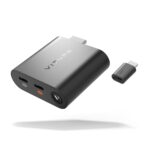

Description
Unlock your iPhone’s XR potential! iPhone 15 and later models can connect directly to VITURE XR Glasses for standard SpaceWalker features. But with the USB-C XR Charging Adapter, you unlock multiple virtual screens, Immersive 3D, Spatial Video support, and VR video playback—all while keeping your phone charged!
With the USB-C XR Charging Adapter, you get enhanced 3DoF tracking, VR capabilities, and multiscreen support on iPhones with a USB-C port.
Important: iPhone 16e is not compatible with VITURE XR Glasses. For VITURE Luma Ultra XR Glasses, the USB-C XR Charging Adapter offers partial compatibility.
If you are using iPhone 14 or earlier models, with our HDMI XR Adapter for Lightning iPhones, you can unlock the multi-screen functionality, Photo Gallery and VR video support within the SpaceWalker app.
VITURE offers a range of adapter products, to understand the capabilities of your specific adapter, explore the feature comparison of adapters here.
Features
Stream Your Favorite Shows & Movies on the XR Glasses
Enjoy unrestricted access to all your favorite streaming apps on your iPhone — with a direct wired connection to your iPhone, there’s nothing you can’t watch.
Please note that watching downloaded content in specific apps on the iPhone is not supported.
Unique and Advanced Features within SpaceWalker
The USB-C XR Charging Adapter enhances SpaceWalker’s functionality, enabling multi-screen capability, Pin Mode, and 1-Click 3D within the SpaceWalker app.
Discover more at SpaceWalker for iOS
Stay Charged While You Watch
Never let a dead battery stand in the way of the next episode or the satisfying finale of the latest blockbuster: plug in while you watch and keep your battery at 100%!
Fully-Private Cinematic Immersion
No more watching on tiny screens, no more people watching over your shoulder — let your device’s display go dark as you enjoy your favorite shows and movies on VITURE XR Glasses.
What’s In The Box:
- USB-C XR Charging Adapter
Tech Specs
| Color | Black |
|---|---|
| Dimensions | 160.0 × 35.0 × 10 (mm) |
| Weight | 21.8g |
| Bluetooth | Bluetooth 5.2 (BLE 2Mbps Rates) |
| Connector | USB-C |
| USB-C1 Output (Charging) | 45W (5V~3A, 9V~2A, 12V~3A, 15V~3A) |
| USB-C2 Output (XR Glasses) | 5V~1A, Supports DP, HDCP 1.3 |
| USB-C2 Video Output | 1920×1080 @ 60Hz, 3840×1080 @ 60Hz |
| USB-C3 Input (Charging) | 45W (5V~3A, 9V~2A, 12V~3A, 15V~3A) |
| Data Transfer Rate | USB 3.2 Gen 2 (10 Gbps) |
| USB-C iPhone Pack (XR Glasses & USB-C XR Charging Adapter) |
Lightning iPhone Pack (XR Glasses & HDMI XR Adapter) |
XR Glasses & USB-C to Glasses and Charging Adapter | XR Glasses | |
|---|---|---|---|---|
| Compatibility | All devices with DisplayPort over USB-C. - iPhone with USB-C - iPad with USB-C - etc. Note: iPhone 16e is not compatible |
- iPhone 14 and earlier models (requires Apple's Lightning AV Digital Adapter) - All HDMI-compatible devices (PS5, Xbox Series X, Xbox Series S, etc.) |
All devices with DisplayPort over USB-C. - iPhone with USB-C - iPad with USB-C - etc. Note: iPhone 16e is not compatible |
All devices with DisplayPort over USB-C. - iPhone with USB-C - iPad with USB-C - etc. Note: iPhone 16e is not compatible |
| Screen Mirroring[1] | ✓ | ✓ | ✓ | ✓ |
| Charge while playing | ✓ | ✓ | ✓ | × |
SpaceWalker Feature Comparison
| USB-C iPhone Pack (XR Glasses & USB-C XR Charging Adapter) |
Lightning iPhone Pack (XR Glasses & HDMI XR Adapter) |
XR Glasses & USB-C to Glasses and Charging Adapter | XR Glasses | |
|---|---|---|---|---|
| Immersive 3D | ✓ | × | ✓ | ✓ |
| Multi-screen Functionality | ✓ Head tracking Trackpad |
✓ Head tracking Trackpad |
✓ Trackpad |
✓ Trackpad |
| Spatial video | ✓ | × | ✓ | ✓ |
| 360°/180° VR video | ✓ | ✓ | × | × |
| 3D VR video[2] | ✓ | × | × | × |
| 1-Click 3D[3] | ✓ | × | × | × |
| Full SBS 3D video[4] | ✓ | × | ✓ | ✓ |
| Auto switch to 3D Mode[5] | ✓ | × | × | × |
| Pin Mode (3DoF)[6] | ✓ | ✓ | × | × |
| Photo Gallery | ✓ Head motion Trackpad |
✓ Head motion Trackpad |
✓ Trackpad |
✓ Trackpad |
| Ambient Mode[7] | ✓ | ✓ | ✓ | ✓ |
| Adjust the XR Glasses' brightness & volume[8] | ✓ | ✓ | × | × |
